

The WaveKat voice prompt generator is a free web tool that turns any text into telephony-ready phone audio — greetings, IVR and auto-attendant menus, voicemail messages, after-hours announcements, and on-hold notices — spoken by studio-quality AI voices. You type the script, pick a voice, and download a file in the exact format your phone system needs. It runs in the browser at platform.wavekat.com/voice/prompts, and you can make your first clips without creating an account.
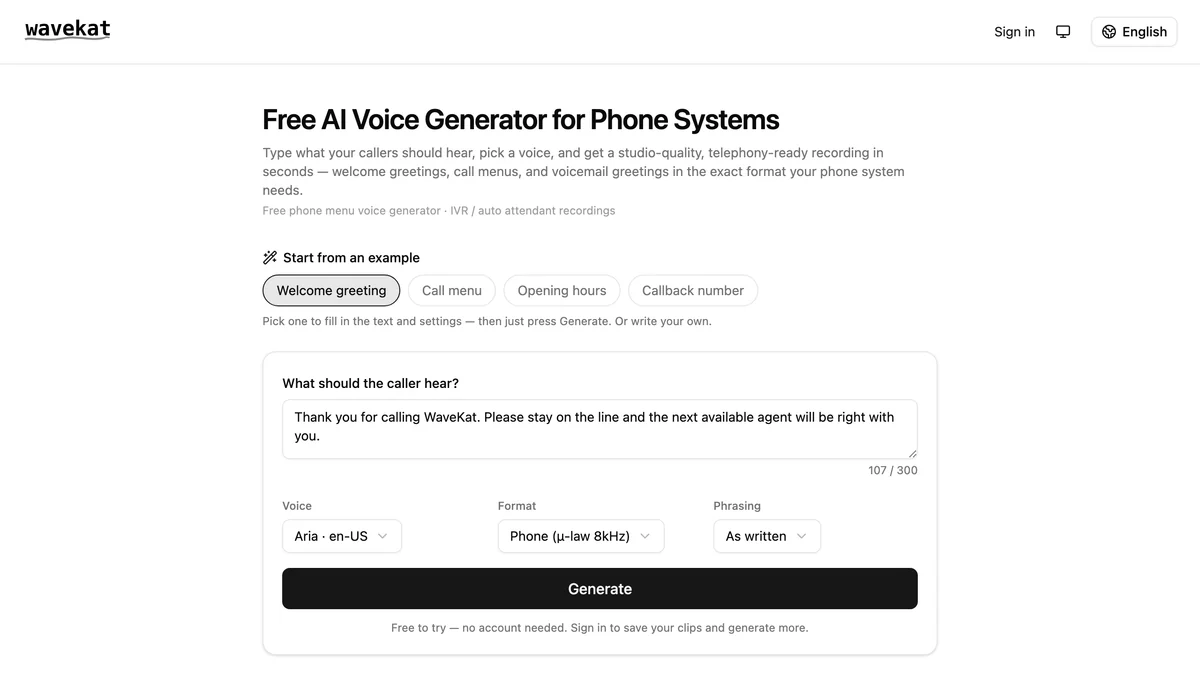
Every business phone needs recordings — and getting them made is oddly hard
Every phone system a business runs — an office PBX, a hosted VoIP line, a Twilio flow — needs recorded audio: the greeting callers hear first, the “press 1 for sales” menu, the voicemail message, the holiday announcement. The recordings are small, but the usual ways of making them are all awkward in their own way:
- Record it yourself, and you get background noise, uneven volume, and a redo every time the script changes a word.
- Hire voice talent, and a ten-second “we’re closed Monday” update turns into a booking, a turnaround time, and an invoice.
- Use a generic text-to-speech site, and you get an MP3 tuned for videos — which your phone system may refuse, or play as distorted mush, because telephony audio has its own formats.
The result is familiar to anyone who’s called a small business: a greeting recorded in one voice years ago, a menu in another, and a voicemail message that’s just the carrier default. The voice prompt generator exists to make the right way the easy way.
What you can make with the voice generator
Each of these is a concrete phone-audio job the generator does, and together they cover what a typical phone system plays:
| Prompt | Example |
|---|---|
| Phone greeting | “Thanks for calling Acme Plumbing — how can we help?” |
| IVR / auto-attendant menu | “For sales, press 1. For support, press 2.” |
| Voicemail greeting | A professional after-the-tone message for when nobody can pick up |
| After-hours & holiday message | “Our office is closed for the holiday and reopens Monday at 9am.” |
| On-hold announcement | A short spoken notice between the hold music — hours, a promotion, a callback offer |
Generate them all in the same voice and your whole phone system sounds like one coherent brand instead of a patchwork of recordings made years apart.
Audio your phone system actually accepts
This is the part generic text-to-speech tools get wrong. Phone systems don’t want a high-bitrate MP3; most of them expect 8 kHz µ-law WAV, the narrow-band format telephone networks have used for decades. Feed them anything else and you’re hunting through re-encoding guides before your greeting plays.
The voice prompt generator outputs every clip in the formats phone systems ask for — 8 kHz µ-law, WAV, or MP3 — so the file drops straight into Asterisk, FreePBX, 3CX, Twilio, and the rest with no conversion step. Files download with clear, descriptive names, ready to upload yourself or hand to whoever runs your phone system.
Which format does your phone system need?
If you’re not sure which of the three to download, here’s what the common systems ask for:
| Phone system | What it expects | Download this |
|---|---|---|
| Asterisk | WAV, 8 kHz, 16-bit PCM, mono (it also plays µ-law) | WAV — or µ-law if your dialplan uses it |
| FreePBX | WAV, 8 kHz, 16-bit PCM, mono | WAV |
| 3CX | WAV, 8 kHz, 16-bit, mono | WAV |
| Twilio | MP3 or WAV; transcoded to 8 kHz µ-law on playback | MP3 or WAV |
| Hosted VoIP / carrier portal | Usually WAV, 8 kHz, mono; some accept MP3 | WAV, unless the upload page says otherwise |
The short version: when in doubt, download the WAV. It’s the format every one of these accepts, and it’s what an upload page means when it rejects your file for being “the wrong format” — almost always a 44.1 kHz stereo MP3 made for video.
How to make a phone prompt in three steps
- Type your script — write the greeting, menu, or message, or start from one of the built-in examples and edit it.
- Pick a voice — choose from a curated set of studio-quality AI voices across multiple languages, and preview how your text sounds.
- Download the file — get a telephony-ready clip in the format your system needs, and upload it. Done.
That’s the whole workflow. A greeting that used to mean booking voice talent — or fighting an audio converter — takes about a minute.
Frequently asked questions
What is the WaveKat voice prompt generator?
It’s a free web tool that turns text into telephony-ready audio — phone greetings, IVR and auto-attendant menus, voicemail messages, and on-hold announcements — spoken by studio-quality AI voices. You type the script, pick a voice, and download a file your phone system can play.
Is it really free?
Yes. You can generate your first clips in the browser with no account and no card. Signing in with GitHub or Google lifts the limit and lets you save a library of your prompts; heavier use is metered against the same free and pro tiers as the rest of the WaveKat platform.
Will the audio work with my phone system?
Yes — clips come out in the formats phone systems expect: 8 kHz µ-law, WAV, and MP3. They drop straight into systems like Asterisk, FreePBX, 3CX, and Twilio without re-encoding. Pick the format your system asks for and upload the file.
Can I use the clips commercially, for my business phone?
Yes — that’s exactly what the generator is for. The voices are commercial text-to-speech voices cleared for phone use. Generate your greeting, menu, voicemail, and on-hold prompts, download them, and load them into your phone system.
What audio format do Asterisk and FreePBX need for prompts?
Both play WAV files that are 8 kHz, 16-bit PCM, mono; Asterisk will also play 8 kHz µ-law. The voice prompt generator outputs exactly those, so downloading the WAV and dropping it into your sounds directory or the FreePBX System Recordings page works without a conversion step.
How is this different from WaveKat Voice, the app?
WaveKat Voice is a desktop app that turns your computer into your business phone — answering and placing calls, recorded and transcribed. The voice prompt generator is a separate free web tool that creates the recorded greetings and menus your phone system plays. They complement each other, but you can use either on its own.
Do I need a phone system at all to use the generated audio?
No — but if you don’t have one, WaveKat Voice can be it. Its call flows answer your incoming calls with a greeting, a menu, and voicemail, and they’re voiced by this same generator: you type the wording for each step and one press voices the whole flow. So you can either download clips for a phone system you already run, or skip the upload entirely and let the flow play them.
Try it
Open the voice prompt generator, type a line, pick a voice, and download a phone-ready clip — no account, no download, no card. If you want the longer story of what it does, the tool’s page has the full rundown, and call flows show what the same clips sound like answering a real call.
Your callers hear your phone system before they hear you. Now making it sound good takes a minute.