

WaveKat Voice supports SIP over TLS as of 0.0.56. Set a line’s Connection to TLS and the port to 5061, and all SIP signaling between the softphone and your provider — REGISTER, INVITE, REFER, BYE — goes over an encrypted connection. It works on Mac, Windows and Linux.
Why TLS matters
Every call starts with signaling: your phone registers with your provider, says who it’s calling, and sets the call up. That traffic carries your SIP account, the numbers you dial, and the authentication exchange. Over plain UDP, anyone on the same network path can read it.
TLS is the standard way to protect it. The connection between WaveKat Voice and your provider is encrypted, and the provider’s identity is verified before anything is sent. A phone that carries your business calls should be able to do that, and protecting your communication is part of earning your trust. So every line in WaveKat Voice can use TLS.
What’s encrypted
| UDP / TCP | TLS | |
|---|---|---|
| REGISTER authentication exchange | Plain text | Encrypted |
| Caller, callee, time (INVITE etc.) | Plain text | Encrypted |
| Hold, transfer, hang-up | Plain text | Encrypted |
| Audio (RTP) | Plain text | Plain text |
| Server identity verified | No | Yes, by certificate |
| Usual port | 5060 | 5061 |
The authentication row is the one people underestimate. SIP uses Digest authentication (RFC 3261), so the password itself never crosses the wire — but the response in the Authorization header is a hash derived from it. Anyone on the same network who captures that packet over UDP can run a dictionary against it offline, and a weak password won’t last. Over TLS, there’s no packet to capture.
How SIP over TLS works
Plain SIP usually runs over UDP on port 5060: each message is a separate packet of readable text. SIP over TLS changes the transport underneath, not SIP itself.
- One connection. The softphone opens a TCP connection to the provider, usually on port 5061.
- Handshake. Before any SIP is sent, the two sides run a TLS handshake. The provider presents its certificate; the softphone checks that it chains to a trusted certificate authority and that it’s issued for the SIP domain. Then they agree on session keys.
- SIP inside the tunnel. Every SIP message after that, in both directions, travels encrypted over the same connection. The messages mark it themselves:
Via: SIP/2.0/TLS, and aContactwith;transport=tls. - The connection stays open. Registration keeps it alive, and the provider sends incoming calls back down it. That’s also how an incoming INVITE reaches a phone behind NAT without any port forwarding.
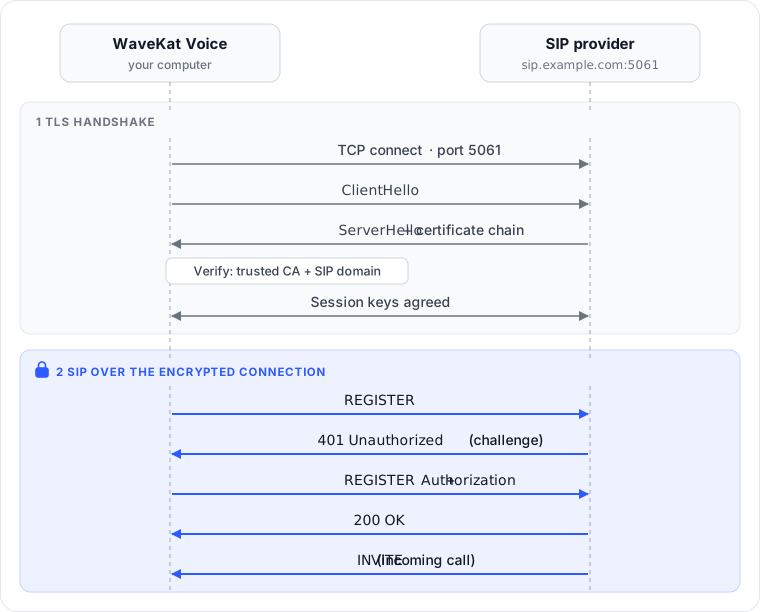
TLS protects one hop: the link between WaveKat Voice and your provider. How your provider carries the call onward, to another carrier or the phone network, is up to them.
How certificates are checked
TLS only stops a man-in-the-middle if certificate checking is strict. Ours:
- System roots only. Certificates are checked against your operating system’s trusted CA list. Nothing is bundled and there are no exceptions.
- Checked against the SIP domain, not the server address. Even if you’ve set a separate outbound server, the certificate must be issued for the account’s SIP domain, as RFC 5922 requires.
- A failure stops the line. No fallback to plain text, no endless retry on “Connecting…”. The line fails with the reason and the certificate’s SHA-256 fingerprint in its error:
security certificate not trusted: not signed by a trusted issuer (sha256:5941fb2b…)The TLS implementation is Rust’s rustls, so there’s no OpenSSL dependency on any platform.
Self-signed certificates and private CAs aren’t supported, and there’s no “trust this certificate” switch. If your provider uses a private certificate, that line has to stay on UDP or TCP.
Check your provider’s TLS before you switch
Two standard commands tell you whether your provider’s TLS will work, before you change anything in the app. The output below is from real runs on 26 September 2026 against two SIP providers: 2talk in New Zealand, and Telnyx.
Step 1: find the TLS host and port
Some providers publish an SRV record for SIP over TLS (RFC 3263) that names the host and port to use. Telnyx does:
$ dig +short SRV _sips._tcp.sip.telnyx.com
1 45 5061 sip-anycast1.telnyx.com.
1 95 5061 sip-anycast2.telnyx.com.
Each line is priority, weight, port, host. Lower priority wins; records with the same priority share the load by weight. Here both hosts have priority 1 and port 5061, so a client spreads connections across them, sending roughly two in three to sip-anycast2.
2talk publishes no SRV record, and the same query returns nothing. That’s common; use the provider’s documentation instead. 2talk’s gives lyra.2talk.co.nz, TLS on port 5061.
Step 2: check the certificate the way a strict client does
Connect to that host and ask OpenSSL to verify the certificate against the SIP domain. For 2talk (output trimmed):
$ openssl s_client -connect lyra.2talk.co.nz:5061 \
    -servername lyra.2talk.co.nz -verify_hostname lyra.2talk.co.nz </dev/null
depth=2 C=US, O=DigiCert Inc, OU=www.digicert.com, CN=DigiCert Global Root G2
depth=1 C=US, O=DigiCert Inc, OU=www.digicert.com, CN=RapidSSL TLS RSA CA G1
depth=0 CN=*.2talk.co.nz
Verification: OK
Protocol: TLSv1.3
Verify return code: 0 (ok)
That tells you three things: the certificate is a wildcard for *.2talk.co.nz, which covers lyra.2talk.co.nz; the chain runs up to DigiCert’s public root; and the connection is TLS 1.3. 0 (ok) means the certificate check should pass.
Here’s what a wrong domain looks like — the same server, verified against a name it doesn’t cover:
$ openssl s_client -connect lyra.2talk.co.nz:5061 \
    -servername lyra.2talk.co.nz -verify_hostname sip.example.com </dev/null
Verification error: hostname mismatch
Verify return code: 62 (hostname mismatch)
WaveKat Voice refuses that connection with a certificate error. The codes you’ll see most:
| Result | Meaning |
|---|---|
0 (ok) | Trusted and valid for your SIP domain |
62 (hostname mismatch) | The certificate isn’t issued for this SIP domain. Check the domain with your provider |
18, 19 or 20 | Self-signed or from a private CA. Not trusted by your system |
| Connection refused or timed out | TLS isn’t served on that host and port, or a firewall is blocking it |
OpenSSL checks against its own CA bundle. On most Linux systems that’s the system store; on a Mac it often isn’t, so treat a 20 there as a hint rather than a verdict.
Step 3 (optional): note the certificate fingerprint
To compare with the fingerprint in WaveKat Voice’s certificate error, print the certificate’s SHA-256 fingerprint and expiry:
$ openssl s_client -connect lyra.2talk.co.nz:5061 -servername lyra.2talk.co.nz </dev/null 2>/dev/null \
    | openssl x509 -noout -fingerprint -sha256 -enddate
sha256 Fingerprint=1D:64:FB:48:21:19:A1:CB:18:43:3B:20:9A:BB:03:96:A1:D2:43:9A:E6:F3:A4:B4:35:3A:33:86:E4:E0:E4:8F
notAfter=Feb 18 23:59:59 2027 GMT
OpenSSL prints it uppercase with colons; WaveKat Voice shows it lowercase without them. The hex digits are the same. When the provider renews its certificate, the fingerprint changes; that’s expected.
Setting it up
- Find your provider’s TLS hostname and port in their documentation. Most use
5061; some use a separate hostname for TLS. The New Zealand provider 2talk, for example, documents5061. - Open the line and set Connection to
TLS. The port field suggests5061. - Check that the account’s SIP domain matches exactly what your provider gave you — that’s the name the certificate is checked against.
- Save. The line re-registers over TLS.
A common trap: Connection TCP with port 5061 is not TLS. It sends plain-text SIP to a port waiting for a TLS handshake, and registration fails.
Line settings sync to your WaveKat account, so the line is still TLS when you sign in on another computer.
Checking that it’s really TLS
Under a line’s connection details there’s a Technical details link. That page shows the values in effect on the running connection, not the ones you typed:
- Connection is
TLS; - Reachable at ends in
;transport=tls; - in SIP messages, every
ViaisSIP/2.0/TLS.
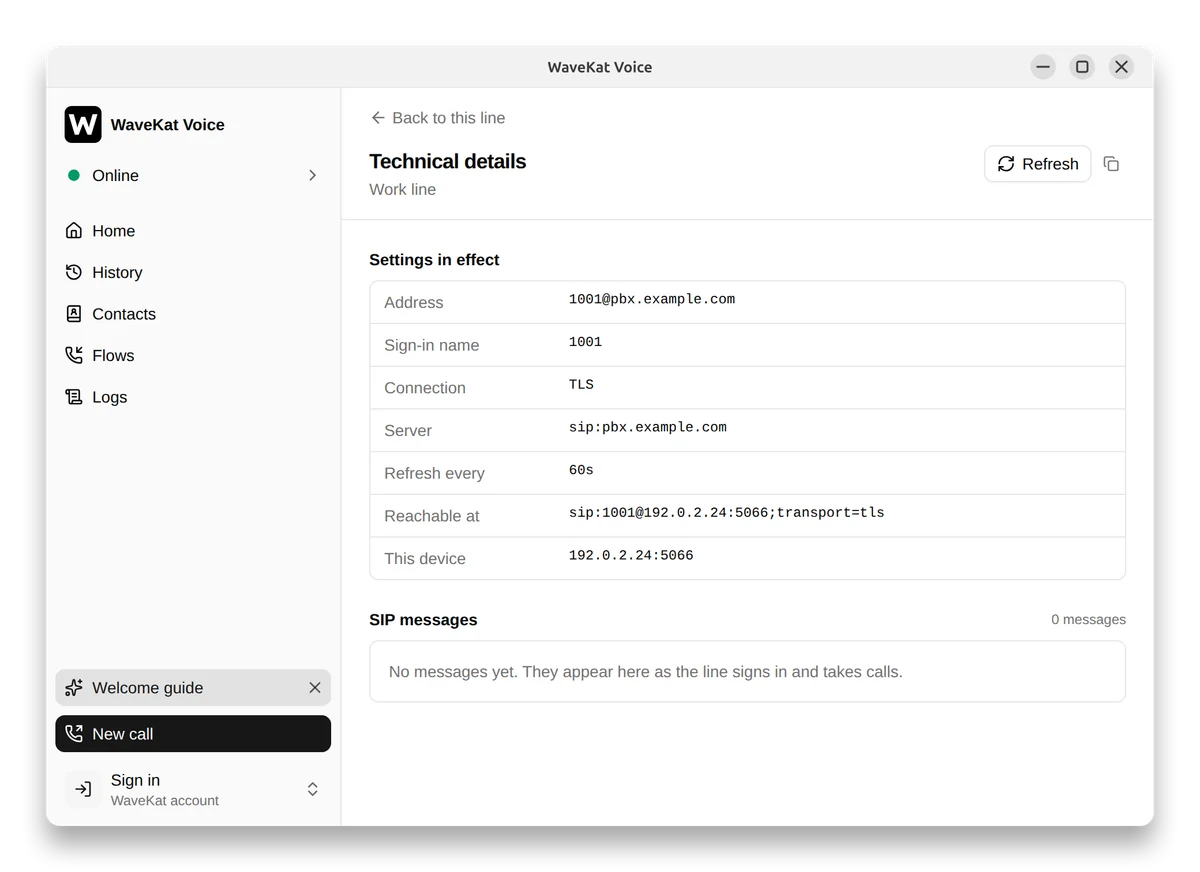
A REGISTER from that line looks roughly like this (an example, from the same demo line as the screenshot):
Via: SIP/2.0/TLS 192.0.2.24:5066;branch=z9hG4bK…
Contact: <sip:[email protected]:5066;transport=tls>
Encryption you can’t check is encryption you have to take on faith, so TLS ships with a way to see the transport actually in use.
The SIP message log lives in memory only: never written to disk, gone when the app quits. The response in Authorization and Proxy-Authorization headers is blanked at capture, so a copied log doesn’t leak the password hash to whoever you send it to.
Troubleshooting
| Symptom | Likely cause | Fix |
|---|---|---|
| “Your provider’s server didn’t prove it is who it says it is” | SIP domain doesn’t match the certificate, or the provider uses a private certificate | Check the SIP domain; for a private certificate, ask the provider for an endpoint with a publicly trusted one |
| “The secure connection to your provider couldn’t be set up” | Wrong port (often 5060), or TLS isn’t offered on that hostname | Use the port and hostname from the provider’s docs |
| Won’t register at all after switching | TCP + 5061, or a firewall blocking outbound 5061 | Set Connection to TLS; allow outbound TCP 5061 |
| Worked, then stayed unregistered | The TLS connection dropped (provider restart, router reaping idle connections) and wasn’t re-established | Press Sign in again on the line |
Known limitation: no automatic reconnect after a TLS drop
UDP has no connection to lose, so a network blip goes unnoticed. TLS is one long-lived connection: if the provider restarts or a router reaps it, the line stays unregistered until you press Sign in again. If a line needs to take calls unattended — say, one a call flow answers overnight — factor that in before switching.
FAQ
Can I turn on TLS for just one line?
Yes. Connection is a per-line setting, so each line can use UDP, TCP or TLS independently.
Do I have to use port 5061?
No. 5061 is the default port for SIP over TLS, but follow your provider’s documentation; some use a different port or a separate hostname.
Is TCP on port 5061 the same as TLS?
No. That sends plain-text SIP to a TLS port, and registration fails. Set Connection to TLS.
Which TLS versions are supported?
TLS 1.2 and TLS 1.3, the two versions considered secure today. TLS 1.0 and 1.1 date from 1999 and 2006, rely on broken algorithms such as MD5 and SHA-1, and were formally deprecated by the IETF in 2021 (RFC 8996); major browsers dropped them years ago. Leaving them out means a connection can’t be downgraded to an insecure protocol. In practice it costs nothing: current SIP providers support TLS 1.2 or later, and 2talk, in our test above, negotiated TLS 1.3.
Do I need port forwarding on my router with TLS?
No. Incoming calls arrive over the TLS connection the softphone opened itself. Your firewall only needs to allow outbound TCP on 5061, or whichever port your provider uses.
Does TLS make calls slower?
Not noticeably. The TLS handshake happens once, when the connection is set up; registration and every call after that reuse the same connection instead of handshaking again.
How do I confirm a line is actually encrypted?
Open the line’s Technical details: Connection is TLS, Reachable at ends in ;transport=tls, and SIP messages show Via: SIP/2.0/TLS.
What happens if my provider’s certificate expires or changes?
An expired certificate fails verification: the line stops with a certificate error and never falls back to plain text. If the provider switches to another valid certificate from a trusted CA, there’s nothing to do, because WaveKat Voice checks the chain and the SIP domain rather than pinning one specific certificate.
Are self-signed certificates supported?
No. WaveKat Voice trusts only the system’s root CAs, so a server with a certificate from a private CA can’t connect over TLS.
What’s the difference between SIP over TLS and a sips: address?
A sips: address asks for TLS on every hop the call takes; a sip: address with ;transport=tls protects the current hop. WaveKat Voice lines use the latter, protecting the connection between you and your provider.
Try it
Download WaveKat Voice or update to 0.0.56, switch a line to TLS, and open Technical details to check. Other connection settings are in the SIP setup guide.